Last month, a manager pinged the group chat with a simple question: "Who owns this request now?"
Nobody answered for ten minutes. Not because people did not care, but because the process lived in everyone's head. One person thought it was Ops. Another assumed it was IT. Someone else said, "It depends."
Meanwhile, the request sat there, half-done, missing key details, waiting for a handoff that was never clearly defined. By the end of the day, the request moved again, but only after three separate follow-ups, two duplicate messages, and one frustrated escalation.
This is what a messy process looks like in real life. It is not dramatic. It is expensive.
Here is the part most teams miss: the problem is rarely effort. The problem is that the process has no "happy path" everyone can follow, and no simple rule that stops bad work from entering the system. So let's fix it quickly, without turning it into a six-month project.
The real goal
Your goal is not to document everything. Your goal is to create a repeatable path that produces the same outcome every time, even when the team is busy, new people join, or priorities change.
A good process should answer three questions instantly:
- What starts this?
- Who owns it right now?
- What does "done" look like?
If it cannot answer those, the process is not a process. It is a rumor.
The turning point: one gating check
When I build playbooks with teams, the biggest improvement does not come from adding steps. It comes from preventing incomplete requests from entering the workflow. That is the gating check.
A gating check is one short list of inputs that must be present before work starts. If the inputs are missing, the request does not move forward. No debates. No exceptions. No back and forth. This single change eliminates the most common operational waste: rework caused by missing information.
The 15-minute playbook method
Here is the method I use because it works fast and scales.
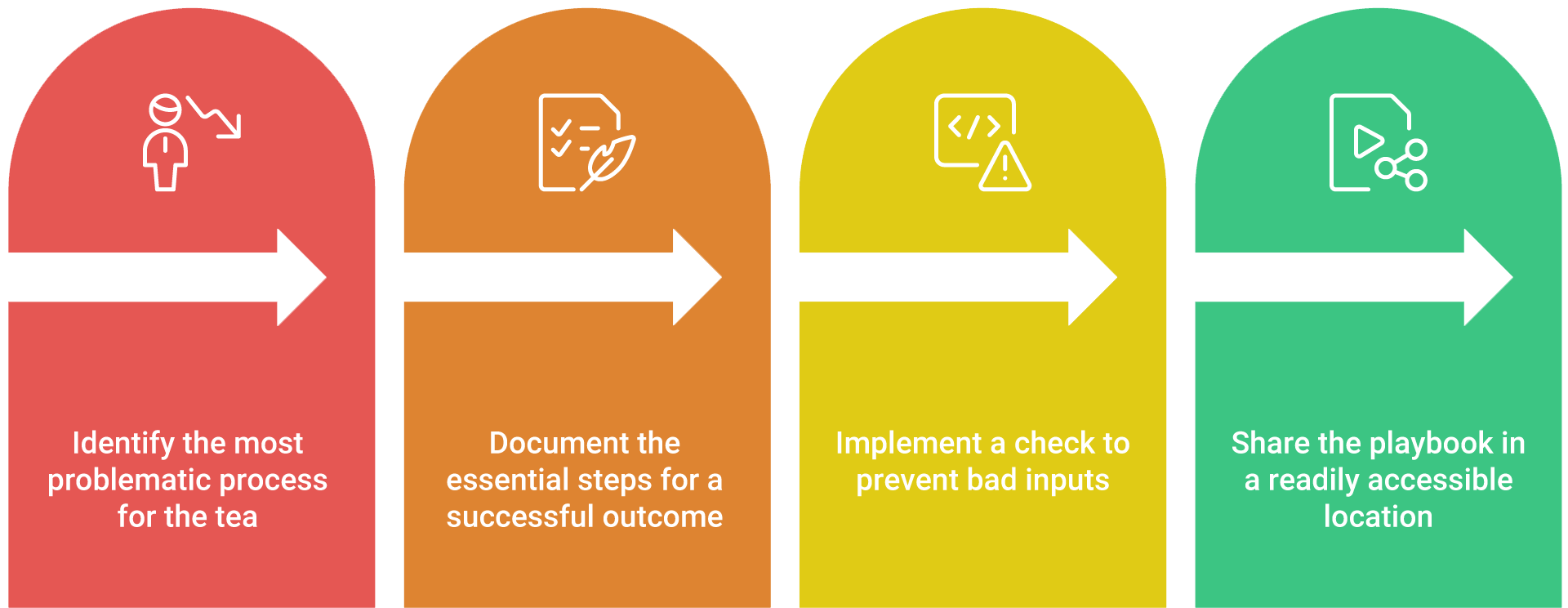
- Choose one process that hurts. Not the biggest process. The most painful one. The one that generates repeats, confusion, and escalations.
- Write the happy path in plain language. Not a flowchart. Not a perfect diagram. Just the minimum steps that lead to a successful result.
- Add a gating check to protect the process from bad inputs.
- Publish it in one place your team will actually use. Keep it compact. If it becomes a novel, nobody will read it, and nothing will change.
That is your playbook.
What happens when you do this
- In week one, you will see fewer "quick questions."
- In week two, you will see fewer handoff delays.
- In week three, you will see more confidence because people stop guessing.
The best part is that this does not require a new tool. It requires a new standard.
A simple example: onboarding that actually works
Let's take onboarding, because it is the perfect stress test. If your process is unclear, onboarding exposes it immediately.
A new hire is starting Monday. The manager asks for "access to everything." IT asks, "Which tools?" Ops asks, "Who approves?" The request bounces. Monday arrives. The employee cannot log in. Everyone scrambles.
Now compare that to a one-page playbook.
- Playbook name: New Hire Tools and Access
- Purpose: Every new hire has required access by Day 1.
- Owner: Hiring Manager starts it. Ops validates it. IT provisions it.
- Gating check (non-negotiable): The request must include role, start date, manager, required applications, and special access needs.
Once that gating check exists, everything improves because nobody is working with vague instructions.
Happy path
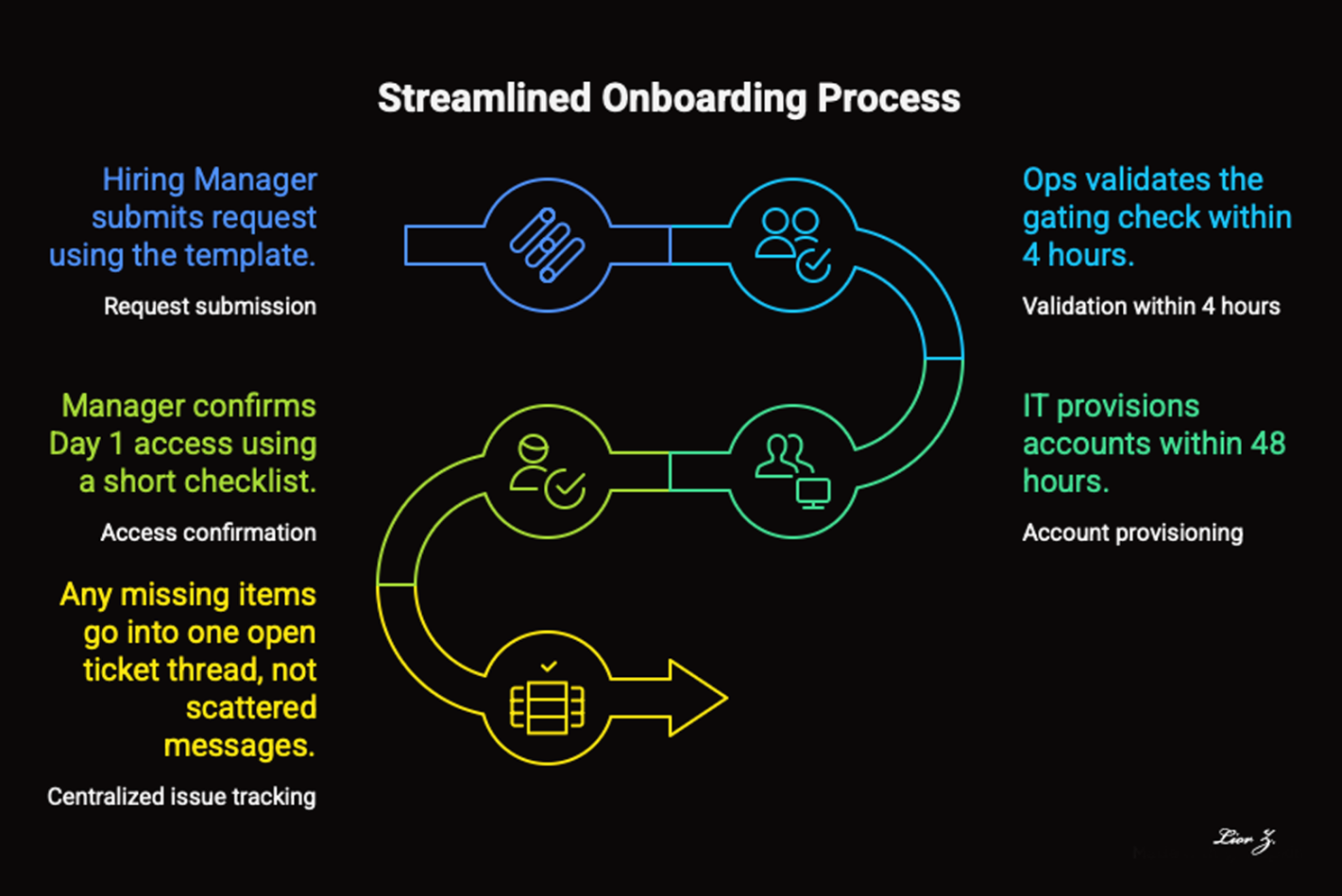
- Hiring Manager submits request using the template.
- Ops validates the gating check within 4 hours.
- IT provisions accounts within 48 hours.
- Manager confirms Day 1 access using a short checklist.
- Any missing items go into one open ticket thread, not scattered messages.
One metric: Percent of new hires ready on Day 1.
Samples you can copy today
- For requests: Request must include owner, due date, scope, and definition of done.
- For changes: Change must include rollback plan and test evidence.
- For purchasing: Purchase must include vendor quote, cost center, and approver.
- For scheduling: Schedule change must include reason, impacted orders, and decision owner.
Templates
Copy and paste these as-is. Keep your playbook compact so people actually use it.
1. Playbook template (quick reference)
- Playbook name
- Purpose (one sentence)
- Trigger (what starts it)
- Owner (who drives it)
- Gating check (required inputs)
- Happy path (6 to 8 steps)
- Definition of done
- Metric (choose one)
2. Request intake template
- Name
- Request owner
- Due date
- Scope
- Definition of done
- Dependencies
- Approver
- Notes
3. Done checklist
- Work completed: Yes / No
- Validated by owner: Yes / No
- Docs updated: Yes / No
- Handoff completed: Yes / No
- Open issues logged: Yes / No
Example of a filled-in quick reference
- Playbook name: New Hire Access
- Purpose: Tools ready by Day 1
- Trigger: Offer accepted
- Owner: Hiring Manager
- Gating check: role, start date, manager, required apps
- Happy path: 1) submit request 2) validate inputs 3) provision 4) confirm Day 1 5) log gaps
- Definition of done: manager confirms all access
- Metric: percent ready on Day 1
Your move this week
Pick one process that causes repeated confusion. Write the happy path. Add one gating check. Publish it where the team lives.
Small change, big impact: fewer handoffs, less rework, faster execution.
Lior Zaken
Operational Excellence & Continuous Improvement